Zoomba Zoomba

New WinCustomize Subscriber Skin: Rockstar by Stardock Design!

New WinCustomize Subscriber Skin: Rockstar by Stardock Design!

Get it while it's hot!

https://www.wincustomize.com/subscribers.aspx

As part of our ongoing effort to give subscribers more bang for their buck, we added professional skins to the subscription package earlier this year.  To start things off we released Stardust, a new skin by Adni18.  Today we're ready to release another skin, and give you a hint of what's next in the pipeline.

Our second Subscriber-Only skin is Rockstar by community veteran Hippy!

Rockstar turns your desktop into concert stage with the look and feel of classic guitars, speakers and amps.  Rockstar comes with 6 great substyles, letting you pick exactly the kind of amp you want.  It's the perfect skin for music enthusiasts, especially the rockers out there.

If you're already a subscriber, you can get the skin HERE.

If you're not a subscriber, then you had better sign up RIGHT NOW!

Our next Subscriber skin is going to be Boulder from MikeB!  A great skin that will give your desktop a clean, chiseled look.  Expect some teaser previews of the skin soon!

Stay tuned for news on MyColors and the full Rockstar Suite later today!

218,063 views 73 replies
Reply #27 Top
Nice looking skin, now I just need to hear back from support on whether my problem was fixed by the developers in WB or soon to be fixed.. :(
Reply #28 Top
Great skin. The substyle names are clever.  :CONGRAT:  Would of expected an animated please wait screen but that's not a negative. It just screams for it.  ;) 
Reply #29 Top
Check your WB settings.
Thanks Zubaz :D
Reply #30 Top
Would of expected an animated please wait screen but that's not a negative. It just screams for it.


My thoughts exactly. Nice start menu gfx. :) 
Reply #31 Top
but the window frames (the most important part of a blind, imo) are just hideous. Sorry, but that's just my opinion.
ok, after using the blind for a few hours, I'd like to take this statement back. It starts to look more and more like the body of a guitar the longer I look at it. And I really like the buttons. A bit large, but they're spot on.
Reply #32 Top
Would of expected an animated please wait screen but that's not a negative. It just screams for it.
There is a version with one but it was actually done the day everything was getting ready for release. I was just messing around with it but it came out ok, so I may rerender a better quality animation and it'll be a future update. Didn't really have time to include it for release.
Reply #33 Top
Its pretty nice, but my one issue is that having the taskbar at the top, the pick ends up cut off since its position is unchanged. I don't notice a menu delay with the control panel, at least nothing more than a few seconds. I agree the taskbar buttons appear a bit low. I notice nothing wrong with the logon/logoff buttons here. I think the start menu is rocking, but otherwise not that crazy about it.
Reply #34 Top
Looks rocking. :CONGRAT:
+1 Loading…
Reply #35 Top
logon/logoff buttons
Is an XP issue only.
Reply #36 Top
Cool! Can't believe you used Marshall amps for the startmenu! I didn't think we'd see this skin this soon so yesterday I started making possible docks for it....out of Marshall amps! :LOL:
Reply #37 Top
The mouseover on the buttons and menu highlights are awesome!
Reply #38 Top
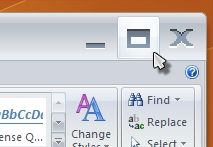
ok, I just found a strange thing... this blind seems to "huge-ify" the buttons in Office 2007... is this just a setting that I can change? Or is it something I'll have to live with while running this blind?
Reply #39 Top
Thank You for this Hippy  :) 
Reply #40 Top
Very nice work Hippy. Thanks.
Reply #43 Top
NOT FOR $14.95 :(

The IconPackager looks great, but Stardock's so impress about the suite they feel they have to charge more than expected charge for it.

The argument why they charge so much for other suites is due to use of copyright materials being used, therefore they have to pay the third party for using them.

Now you go and purchase a $69 Object Desktop, Stardock is charging you all over for the same software. Wait! They give you $5 off. I'm not impressed!

Some terre à terre (French word to refer to the lowest class of trash) will be replying to my comment against my opinion. While Stardock can charge whatever they want for the own contents, it's that kind of gestures that drive others to force life for a much enjoyable living. That's how clear I will get.

I just want to let PixelPirate knows that the Icons that amazing and they deserve any $ for hard work put into them.
+1 Loading…
Reply #44 Top

Elsius... here's how the pricing works for MyColors Themes...

  • Full Theme: $19.95
    Why: MyColors Themes are bundled with the software required to run them.  You are paying for the technology as well as the theme itself.  This is for users who have no software and want JUST the theme.
  • WinCustomize Subscriber: $14.95 (when applicable)
    Why:  WC subscribers, in the case of Rockstar, already have free access to the skin.  However, being a WC subscriber doesn't guarantee that you own the software to run the rest of the theme.  So if you are just a WC sub, you can get the whole thing without having to worry about software for $5 off
  • Object Desktop Subscriber: $9.95
    Why: You already have all of the software, so we knock off $10.  You're just paying for the skins at this point.

Obviously, the best deal is if you're an ODNT subscriber since you've already purchased the tech to run the theme.

If you went to the Rockstar Theme page on MyColors, you'd clearly see a large button for ODNT subscribers.  Before yelling about how we're ripping subscribers off, please read the product information.

https://www.stardock.com/products/mycolors/wincustomize/gallery.asp?p=rockstar

Reply #45 Top
I purchased the mycolors Rock Star theme my question is about the Gadgets, i was told there would be a Media Player Gadget but in my Download that is not there only the Weather and Clock Gadget how do i get the Media Player Gadget.
Reply #46 Top
Now that's more like it :CONGRAT:

I was going through some heart-attack :(

I've always wanted to support Pixelpirate again right after I've seen the RockStar Iconpackager screenshot, I was expected the usual price though the IconPackager is PRICELESS.

Thank you for your order. Your order has been accepted and is being processed. Please print this page for your records. For questions regarding your order, please contact [email protected] and include your Order number located below. Your order number is: 39V564850M2

Best Not to put the whole numbers.

I'll try it when I get home :( :CONGRAT:
Reply #47 Top
Excellent work, Hippy and PixelPirate.
Reply #48 Top
I dont have the icons but yes they look pretty damn good too. :) 
Reply #49 Top

I purchased the mycolors Rock Star theme my question is about the Gadgets, i was told there would be a Media Player Gadget but in my Download that is not there only the Weather and Clock Gadget how do i get the Media Player Gadget.

Where was there mention of a media player gadget?  I don't believe there is one so I'll need to track down anywhere it says there is one.

Reply #50 Top
Where was there mention of a media player gadget? I don't believe there is one so I'll need to track down anywhere it says there is one.


Right here,jammin' media player gadgetWWW Link