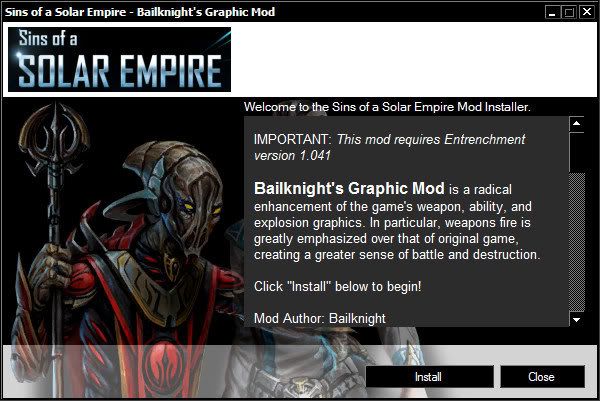
[Tool] Sins Mod Installer

Version 1.0 has been released.

Disclaimer
This tool and source code can be used for whatever you wish as long as it's not malicious in nature. I'm not responsible for anything this tool is used for. Any comments and questions may be directed to thraka_andy AT hotmail.com

Features

  • XML based file controls install
  • Branding based on two PNG files which cover the whole backdrop of the tool
  • Multithreaded install allowing cancel
  • Only supports copyFolder and copyFile actions currently

Requirements
Microsoft .NET Framework 2.0

The mod.xml file should be customized to have your mod information in it. The mod name and version should be filled out. Additionally you may replace the sins_logo.png file with your own png to brand the installer with your mod logo.

A schema has been provided for the mod.xml file to guide you with the correct nodes and data needed to run the install. You should test the installer before you release your mod!!

The easiest way to install your mod is to just have all the data in a sub folder which is copied to the sins user mod folder. No need to have multiple other zip\rar's to extract, just have it all packed in the single distribution zip\rar that users download.

Download the tool

Download the source

Note
The source code is written in VB.NET and uses a VS 2008 solution\project that targets framework 2.0. I chose VB because I felt it would be easier for new programmers to tweak the code. Enjoy.

56,139 views 17 replies
Reply #1 Top

Some thoughts on some more features. One thing that really sucks about the modding with new textures is you have to either install them in the actual game data folder over the existing ones, or copy the whole textures from there (1 gig) to your mod folder and then copy in your new textures.

I was thinking about making the installer have a button near the button that is labeled "Components...". Clicking this button displays a dialog to the end-user and lists the aspects of the mod they wish to install.

Really though, what could a user choose to install or not? The only thing I can really think of whole textures issue. What other optional components? Perhaps new sounds or something. Maybe someone can come up with some ideas.

The problem that may be run into though is (and I may be wrong in aspects of this) your mod will have a value assigned to based on an algorithm compiled against it when you load the mod in the game. This is probably done to ensure when you are playing in multiplayer you are using the same mod as someone else and others don't hack them. I don't know what makes up this number though (do they only calculate the data files? or do meshes affect it? etc...) So do optionally installing other sound or graphics files effect it? If I install the textures to the base game, does this make multiplayer unplayable unless I play against someone who has done the same thing?

What I was thinking of doing is breaking the XML out into sub sections. The Actions would have sub groups which define the Component to install and one of these would have to be labeled MAIN. This component is always installed and you cannot turn it off. The optional stuff my be on by default but users could click that [Components...] button and turn them off. Additionally you could code the XML to turn off specific features when one is turned on. This would allow the user to see two components related to where textures are installed, and choose between them
1) [X] Install textures to mod directory (Will use 1 GB+ of space)
2) [X] Install textures to game directory (Will affect main game and may affect other mods)

If 1 is chosen, 2 is turned off, and if 2 is chosen, 1 is turned off...

Thoughts?

Sample Xml:

<Install>
    <Component name="main">
        <Actions>
            <copyFolder.... />
            <copyFile .... />
        </Actions>
    </Component>
    <Component name="texturesMod" default="on" displayText="Install textures to mod directory (Will use 1 GB+ of space)">
        <Actions>
            <copyFolder.... />
            <copyFile .... />
        </Actions>
        <Restrict id="texturesGame" />
    </Component>

    <Component name="texturesGame" default="on" displayText="Install textures to game directory (Will affect main game and may affect other mods)">
        <Actions>
            <copyFolder.... />
            <copyFile .... />
        </Actions>
        <Restrict id="texturesMod" />
    </Component>
</Install>


Reply #2 Top
# Multithreaded install allowing cancel


Well, that's the best part of any program! :p

You can actually play with differing mesh and texture files. It will yell at you but not kick you out. The problem only comes up when you have differing game files, as those can't be reconciled.
Reply #3 Top
Yah 1.3 is here! Some people had asked me to put on an option (that I originally proposed) to allow the user to choose if they would like to install textures to the game directory or the mod directory. Well I decided against that because I felt this was too much of an important flaw in the modding system that the developers would eventually address it and address it soon. And my predication came true! :)

Patch 1.3
---------------------------------------------------------------------------
Modding:
---------------------------------------------------------------------------
-Can now mod in different textures without copying the entire texture directory.


If anyone has been using the mod installer they should upgrade their XML to not:
1) Copy the new textures into the game folder
2) Copy the game textures into the mod folder

I'm still looking for feedback from people who've used the installer. I haven't been doing any new features on it because no one has requested any features and I've been working on the StringEditor.
Reply #4 Top

This actually isn't out-of-date at all.  It works perfectly & I'm probably going to use it in my next release of Bailknight's Graphic Mod.

The only request I have is to add in a Delete Folder function, so we can get rid of any redundant or unnessesary files from old versions of our mods before installing.

Reply #5 Top

Quoting Moguta, reply 4
This actually isn't out-of-date at all.  It works perfectly & I'm probably going to use it in my next release of Bailknight's Graphic Mod.

The only request I have is to add in a Delete Folder function, so we can get rid of any redundant or unnessesary files from old versions of our mods before installing.

Indeed sadly I never realised the download was public otherwise DS may have been using this for quite some time. I'll take a look in to using this for the next release :)

EDIT:
Interestingly enough trying to just run the file without messing causes the error:

Folder Missing: C:\Program Files\Stardock\TotalGaming\Sins of a Solar Empire

Which ofcourse these days with impulse being around doesnt exist, and should be something similar to depending on the OS bit type:
C:\Program Files\Stardock Games\Sins of a Solar Empire
C:\Program Files (x86)\Stardock Games\Sins of a Solar Empire

Interesting how the installer actually checks for the games installation quite odd that.

To add to the edit:

Im using Windows 7 64bit and couldnt find any reference to that folder I mentioned above anywhere in my registry.

Reply #6 Top

nacey the registry values you are looking for are


HKEY_LOCAL_MACHINE\SOFTWARE\Stardock\Drengin.net\sins
HKEY_LOCAL_MACHINE\SOFTWARE\Stardock\Drengin.net\sinsentrench
HKEY_LOCAL_MACHINE\SOFTWARE\Stardock\Drengin.net\sinsdiplo

For Vista 64 bit and windows 7 64bit;
HKLM>SOFTWARE>Wow6432Node>Stardock>Drengin.net>sins
HKLM>SOFTWARE>Wow6432Node>Stardock>Drengin.net>sinsentrench
HKLM>SOFTWARE>Wow6432Node>Stardock>Drengin.net>sinsdiplo

these are the registry keys that are used to locate the sins/entrenchment/diplomacy files

there isa path value in each of the entries that has the exact path to the files

hope this helps

harpo

Reply #7 Top

Quoting harpo99999, reply 6
nacey the registry values you are looking for are


HKEY_LOCAL_MACHINE\SOFTWARE\Stardock\Drengin.net\sins
HKEY_LOCAL_MACHINE\SOFTWARE\Stardock\Drengin.net\sinsentrench
HKEY_LOCAL_MACHINE\SOFTWARE\Stardock\Drengin.net\sinsdiplo

For Vista 64 bit and windows 7 64bit;
HKLM>SOFTWARE>Wow6432Node>Stardock>Drengin.net>sins
HKLM>SOFTWARE>Wow6432Node>Stardock>Drengin.net>sinsentrench
HKLM>SOFTWARE>Wow6432Node>Stardock>Drengin.net>sinsdiplo

these are the registry keys that are used to locate the sins/entrenchment/diplomacy files

there isa path value in each of the entries that has the exact path to the files

hope this helps

harpo

Yeah thanks for confirming those Harpo it was where I was looking already, sadly they all point to the correct directories so its not an install issue my end >.<

Reply #8 Top

This code needs to be changed to take into account the 64-bit OS' possible registry locations:

        Private Sub GetFolders()
        'Get paths
        _pathSinsUser = IO.Path.Combine(Environment.GetFolderPath(Environment.SpecialFolder.LocalApplicationData), "Ironclad Games\Sins of a Solar Empire")

        Dim regKey As Microsoft.Win32.RegistryKey
        regKey = My.Computer.Registry.LocalMachine.OpenSubKey("SOFTWARE\Stardock\Drengin.net\sins", False)
        If Not regKey Is Nothing Then
            _pathSinseInstall = regKey.GetValue("Path")
            If _pathSinseInstall Is Nothing Then _pathSinseInstall = ""
            regKey.Close()
        End If

        If _pathSinseInstall = "" Then
            _pathSinseInstall = IO.Path.Combine(Environment.GetFolderPath(Environment.SpecialFolder.ProgramFiles), "Stardock\TotalGaming\Sins of a Solar Empire")
        End If

        If IO.Directory.Exists(_pathSinsUser) = False Then
            MsgBox("Unable to find local sins folder. Have you run the game under the current user before?" & vbNewLine & "Folder missing: " & _pathSinsUser, MsgBoxStyle.Critical, "Error")
            Application.Exit()
        ElseIf IO.Directory.Exists(_pathSinseInstall) = False Then
            MsgBox("Unable to find sins program folder." & vbNewLine & "Folder missing: " & _pathSinseInstall, MsgBoxStyle.Critical, "Error")
            Application.Exit()
        End If
    End Sub

ThrakaAndy, you got that?

Reply #9 Top

Oh also minor suggestion here, could you setup a default folder for all the extra files that users dont need to use and mess with just to save confusion.

Example:
SinsModInstaller.exe
./setup/backdrop.png
./setup/mod.xml
./setup/mod.xsd
./setup/sins_logo.png
./setup/SinsModInstaller.pdb


Reply #10 Top

Sure! I'll get on to doing all these suggestions tomorrow and have a new build for you guys to play with. The latest string editor tool has code that handles the 64-32 reg searching, so no worries. :)

+1 Loading…
Reply #11 Top

Awesome!  :)  Hope to be able to test it out soon (though not too soon, as I'm going on holiday va-ca)!

Thinking about it... that Sins Install Directory path was only utilized with textures in original Sins, wasn't it?  Unless there's some other use for it, that code could probably be removed entirely.  The Sins User Directory seems to be all that the installer needs to know.

Reply #12 Top

I'm looking at redesigning the engine a bit. I want to make the install experience more flexible, especially for detecting existing versions of a mod, and upgrading.

Possibly, I can see the long-term future of the installer being an installer for each mod where
1) When you run the installer from outside the mod directory, it does the normal install
1a) It also installs itself to the mod directory (it's only like a couple 100k)
1b) Adds shortcuts for the installer
2) When run from the shortcut, which points to the installer that is in the mod directory, it can auto update the mod somehow

If this type of scenario doesn't work out though, it would be some variation of it. I don't know yet. But I'm re-coding the thing to sort of have the posibility of doing it or other detection\action things. It's also a way for me to touchup my VB code. I do so much C# at work, I love working with VB though :)

It is running in WPF and I'll be doing some neat animated things with it.

Reply #13 Top

That's a neat idea, Thraka.  However, for the auto-update to work as you describe, every mod would need to have it's own publicly-accessible web server so the program could compare the currently-installed version with the newest available version.  Seeing how most mods are hosted on Filefront/Mediafire, though, it doesn't seem many mods have their own dedicated web servers.  (If anyone can think of a way around that requirement, please do advise!)

I can see the use of performing an actual registered-installation so that a user could easily uninstall the mods.  But I'm not sure about that auto-update.  Incorporating seperate methods of installing vs. patching would certainly be a help, though!  Also, how about a final option that asks whether to activate the mod and/or start the appropriate version of SoaSE?  (Just to be safe, it may be better to activate it *instead* of any already-activated mods, rather than activating it alongside.)

About WPF: I thought that was a rather recent Windows technology.  Will your installer still work on WinXP?

And one small thing... the part of the installer's window just below the title bar doesn't respect Windows colors.  For example, I've got Windows set to white-text on black-windows, and this is how the installer looks to me:

I didn't realize this at first, but evidently there's supposed to be some text in that white area too, which isn't showing because my text color is set to white.

Reply #14 Top

WPF is part of the .NET 3.0 Stack so it should work perfectly fine on anything that supports it so XP, W2000, Vista, W7, Longhorn etc

Sounds great though Thraka although as with Moguta im curious to see how you'd handle "updating", if you did do some form of updating giving modders the ability to delete no longer needed files from the dirs (using a manifest system of some form) would be absoloutely frikin awesome.

I'm continually needing to ask people to delete useless files from the Distant Stars dir and it just complicates the install and can also cause checksum/online issues when people miss a file.

Reply #15 Top

Yeah. I'd absolutely love this because our testers screw patches up almost every week. We have our own webserver and I think most mods should, so that as a requirement isn't a big deal to me at least.

Reply #17 Top

Sorry. Got sideline and forgot because of family i had much vacation time off spending with them. :) I'll get back into this soon.

Maybe auto patching is a better term. Someone just needs to download the full thing and run the installer. It will detect what version is already installed and follow the upgrade instructions, or just do CRC checks on the files and anything that doesn't match it updates. Don't know yet. Thats the future. :)

+1 Loading…