Our new PC...A "Dell-ema" for a first time user

After my ancient laptop of 7 years finally went kaput, I said to myself, "That's IT...I gotta get a new computer."

Well, here it is, an E520:


*Intel Core 2 Duo Processor E6300
*Windows XP Media Center 2005
*1GB Dual Channel DDR2 SDRAM

An early Christmas gift for my honey, actually. I'll be getting a new macbook for work in January...so that will be my baby.

I've never had a PC before ...so it's all new to me. I don't even know half of the PC description that I typed above.

We've got alot to learn. Any advice is appreciated. I gotta say, though, it's pretty nice...hey, at least we figured out how to get online...lol.


65,674 views 22 replies
Reply #1 Top
More ram....2gig is good...
Reply #2 Top
More ram....2gig is good...


I wish I could have gotten the 2GB...but out of my price league.
Reply #3 Top
Wow, impressive looking Rose! I have no clue about things like that too. I usually read the info packs and stumble upon how it works!! DannyB, Doc, or Gid or Just John are good at these things!
Reply #4 Top
You can always add more later, and usually for cheaper than Dell.  Although if you plan to upgrade to Vista, I would definitely bump it up to 2gigs. 

That is a very nice computer and should serve you well.


Reply #5 Top
Just curious - would it have saved you money had you built your own instead of getting a Dell?
Reply #6 Top
There is one item of note on the Dell widescreens (I own a 20" - 2007WFP).

In the onscreen menu, you will find the 'Display Settings', which have a nice feature that allows you to set one of the following when not in the default native resolution:

1:1 pixel ratio (meaning that if you select say 1024 x 768 pixel resolution, that is exactly what you will see - a 1024 x 768 image surrounded by black bars).

4:3 ration (using the same example of 1024 x 768 pixel resolution, you will see the image expanded to the full height of your monitor while keeping the aspect ratio intact - resulting in vertical black bars on each side of the image).

Fill - which is the setting used to fill the monitor screen with any image.

The nice thing about these options is that if you play an older game that does not support widescreen resolutions, you can set the display resolution to a size supported by the game, and then use the monitor's display settings to select either the '1:1' or '3:4' settings which will allow for the proper image during game play.

Note - the '1:1' and '3:4' options are greyed out when in the native resolution, so you need to change the resolution in Windows display properties\Settings tab before using the Dell monitor's onscreen menu to access and apply the optional ratio settings.

A nice touch by Dell - IMO.
Reply #7 Top
Donna

Wow, impressive looking Rose! I have no clue about things like that too. I usually read the info packs and stumble upon how it works!! DannyB, Doc, or Gid or Just John are good at these things!


Well, I just might be looking them up for help.

Reply #8 Top
ID
You can always add more later, and usually for cheaper than Dell. Although if you plan to upgrade to Vista, I would definitely bump it up to 2gigs.

That is a very nice computer and should serve you well.


It does seem to be a really cool machine...as for Vista, I don't know much about that honestly (and how different it is from the current system).


Just curious - would it have saved you money had you built your own instead of getting a Dell?


Honestly, I have no idea...I don't know enough about PC rebuilding and prices to answer that question.
Reply #9 Top
Corky,

Those sound like some pretty cool features. Mine is a 19 inch monitor btw.
Reply #10 Top
Honestly, I have no idea...I don't know enough about PC rebuilding and prices to answer that question.


i dont know about stores in the US (or other areas of Canada for that fact) but where i am in Canada the prices are good enough to build your own for the same...from my own experiences though buying individual parts is a pain in the butt...and for most people i just buy barebone kits (case & pwr, mobo, cpu, ram, vid card and hdd) which is usually cheaper than ready built computers (at least where i am from) the computer stores i purchase from are also small computer shops, and not major companies like dell (i guess im just confident in my computer repair skills )

anyways here is one of the barebone kits of the store here (some say cheap some say expensive but i cant find better deals over here)

Intel Duo Core 2.66 Kit = $688

Intel Dual Core 805 2.66G
250G 7200rpm HD
Foxconn 945G7MA (eh..i know ) DDR2 512M
LG H10N 16x DVD Rewriter
Onboard Intel Video Card
onboard LAN / Sound
Tower case / 400w power
A4 Keyboard/Optical Mouse
Speakers / Front USB2.0
19" Samsung 940BW WideScreen LCD


Reply #11 Top
I love it!! What a wonderful early X-mas present. It brought a big smile to my face.
Let me say it one more time ... Thank you so much!
Reply #12 Top

You definitely did not go low end!  Nice system.

As to the question of price, if you are going low end, you cant beat Dell's prices.  But if you are going to build your own with a best of breed type system, it is best to build your own.  That is why I buy them for family and friends from dell, but make my own.

Reply #13 Top
i dont know about stores in the US (or other areas of Canada for that fact) but where i am in Canada the prices are good enough to build your own for the same...from my own experiences though buying individual parts is a pain in the butt...and for most people i just buy barebone kits (case & pwr, mobo, cpu, ram, vid card and hdd) which is usually cheaper than ready built computers (at least where i am from) the computer stores i purchase from are also small computer shops, and not major companies like dell (i guess im just confident in my computer repair skills )


Dell has some decent systems that are hard to compete with on custom builds. So if you get custom builds, there usually should be a feature (SLI video, etc) that you want that a custom build will offer.

From my end, I'm thinking seriously of painting several Apple II cases in rainbow colors and offering custom builds of those as custom jobs to folks who are nostalgic for older styles but want something new. And I think the idea of filling an apple with PC parts should be enough to make Steve Jobs sick the rest of his life (::::walks away, laughing wickedly::::
Reply #14 Top
Just curious - would it have saved you money had you built your own instead of getting a Dell?


I've never had a PC before ...so it's all new to me. I don't even know half of the PC description that I typed above.


What part did you miss there Kona?
Reply #15 Top
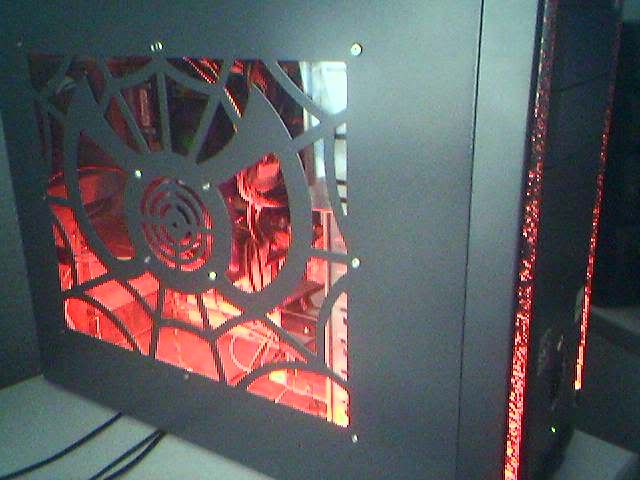
what i like about custom builds:

(That is my pc btw)
Reply #16 Top
Threi, I don't really care about how my PC looks. I custom built just because it won't come loaded with crap, and custom builds save a lot of money and seem to work better.
Reply #17 Top
I custom built just because it won't come loaded with crap


THAT is the best reason!  
Reply #18 Top
I always prefer to build, but there are some people who are not comfortable doing so.

 
Reply #19 Top
i dont care too much how my pc looks either, but there are some things that just bug me (like computer beige) so i have to get things in black. The side case had spiderman, which i think is cool, and was one of the cheapest cases i found, so i got it.

but hey this is a customization site, no?
Reply #20 Top
For people who know very little about how computers work, I always recommend Dell. How often will they have someone that can maintain their PC's after they mess them up over and over? Not saying you do this Inbloom, but I have met many people who take to PC's like sharks take to a bleeding fish. Dell has a decent support and a Walmart-like exchange program so they should have no problems getting the PC fixed. For those who dare to explore, building your own PC is the way to go. Always do your research and make sure you know what you want first, then make sure of your price range. Once you start picking parts for your PC, make sure they are compatible or work good together. It's always good to get parts that work better with each other. Once you got all the pieces, put it together, install Windows, tweak it to your liking and voila, you have yourself a great PC.
Reply #21 Top
~~You definitely did not go low end! Nice system.

As to the question of price, if you are going low end, you cant beat Dell's prices. But if you are going to build your own with a best of breed type system, it is best to build your own. That is why I buy them for family and friends from dell, but make my own.~~

Doc, I am definitely learning a bit more about custom built systems as I have been reading through these posts.


Reply #22 Top
Thanks for the info and comments, Gid, Threi (love that pic), Meowy, ID, and Charles. I am going to keep checking up on this thread to see if I learn anything else.