Jagged edges

I don't think the problem is WindowBlinds related, but my wallpaper will load and look fine. Then I see a blue screen and the wallpaper comes back with little jagged edges. It's just something that started all of a sudden. Any help is greatly appreciated.

Thanks, Mary
18,727 views 48 replies
Reply #1 Top
When does this happen (on an apply of a WB, setting of any wallpaper, etc.)?

Do you have "Apply any Wallpaper supplied" checked in the "Basic Settings" of WB config.?

Have you attempted to load a Wallpaper when WindowBlinds was Unloaded?

Could you load a Screen Shot so we may see the problem?
Reply #2 Top
Suddenly seeing a blue screen isn't always a good sign. You would be wise to find out if this is some sort of software glitch or a larger ptoblem.
Reply #3 Top
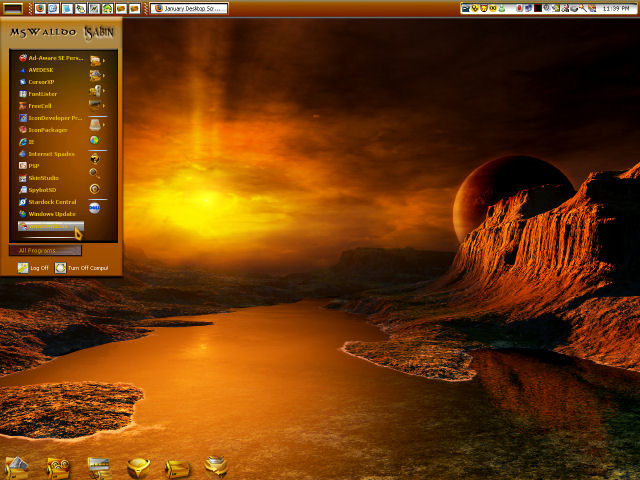
I have AveDesk and WindowBlinds. I shut both down, but it didn't make a difference. I have the "Apply any Wallpaper supplied" unchecked. I recently DL Miranda IM, didn't care for it and deleted it. The wallpaper problem started somewhere after DL Miranda. Below is a partial SS of my desktop. You can see where the arms and all around the image is jagged, where before it wasn't. It starts out a nice sharp wallpaper and then goes blue. It isn't a total blue screen, it leaves a part of my wallpaper at the top of my screen. then the wallpaper becomes full again, but the image is jagged.

SCREENSHOT

Thank you, Mary
Reply #4 Top
Well, ah, thanks for the screenshot. Doesn't tell me much though. Do you use Wallpaper XChange? Have you tried other wallpapers? How about no wallpapers? Have you checked the jpg of the wallpaper in question to see if it has become corrupt? It looks like it may have. lol
Reply #5 Top
right click the desktop. properties. desktop tab. customize. web. if nothing is there and/or checked, click new and see if anything hidden pops up

just a thought
Reply #6 Top
Well, ah, you're oh so welcome for the SS, BigDogBigFeet. It was meant to show the problem. I don't use any wallpaper programs. I did try the "no wallpaper" thing and then chose different wallpapers and still had the same problem. The wallpapers aren't corrupt, I opened them up in different programs such as Paint Shop Pro, etc. and they looked great. I'm glad you find humor somewhere in my posting for help.

Bichur, I tried what you posted and didn't find any thing hidden.
Thank you, Mary
Reply #7 Top
I have more questions does this problem only occur when displaying wallpapers? If you opened one of your programs and leave it displayed for awhile does the same problem occur? Did you run dxdiag? Running dxdiag would be wise at this point. The problem you describe might be the anti-aliasing feature going bad, but, it were that, I would expect the same problem to occur with other software that uses anti-aliasing. How long before the problem presents itself? That is, you say the wall loads and looks fine then the display problem occurs. Have you left Paint Shop Pro display the wall for long enough time to see if the same problem develops? In any case, if it is a graphics driver or hardware problem, then that needs to be tracked down. If it only occurs when displaying walls then my question remains does this happen when other software displays a wall? Do you have DesktopX? If so, please load a theme with a wall and wait for awhile to see if it does the same thing. If this problem occurs only when displaying walls in Windows XP then I'd say some software that is hooked into that function has gone bad. About as much as I know on this one.
Reply #8 Top
Yes, only when displaying the wallpaper. All my wallpapers look fine when viewing them in the wallpaper folder, psp or any other way. I left PSP on for about 5 min. and it didn't change. I just did the dxdiag thing and everything was fine. On Windows startup, the wallpaper is fine for about a min. or two, then the screen goes blank and the wallpaper comes back jagged. No, I don't use DesktopX. It seems it is only affecting wallpaper when applied to my desktop. The problem came about after I installed and then deleted Miranda IM. Thanks for your help, BigDogBigFeet.
Reply #9 Top
Well, MsPooma it's got me stumped. Do you use a registry cleaner? If so use it. If not get one. Because that's my next suspicion a corrupt registry. I use Tune-Up Utilities 2006, a purchased program. Island Dog and some others around here have mentioned other programs. Tune-Up Utilities 2006, I think, is available on CNET Download and has a 30-day free trial offer. Hopefully you'll discover what's causing this. At least the graphics driver and graphics board have been eliminated as possible causes. The corrupt registry as my next suspicion is because you say you downloaded and then deleted Miranda IM. One more thought. Try enabling your Quick Launch bar and after jagged edges appear press the Show Desktop Icon.
Reply #10 Top
I use to have a couple registry cleaners, but I recently reinstalled windows and couldn't find my cds for them. Guess I better get one, I'll try the one you mentioned.
I do have the Quick Launch bar enabled and tried the "Show Desktop" a few different times without any luck. When I find out what caused this problem, I'll be sure to post what is was.
Thanks so much, you've been very kind.
Have a great weekend
Mary
Reply #11 Top
try CCleaner it is a free program and works very well.It is one of the programs Island Dog and myself recomends
Reply #12 Top
Oh there is something most likely loading in your startup that's causing this. I found the clue in your comment number 8 where you say on startup everything is fine for a minute or 2 and then the screen goes black and the wallpaper is jagged. That's is exactly what I would expect from a program loading during startup. That is the temporary black screen, but not the jagged wallpaper from a properly functioning program. Tune-Up Utilities 2006 includes a startup manager program that works well to solve such a problem. With it you can select which programs load at startup, including all those programs that change your file registry to autoload them. You will probably find a great deal of programs are autoloading which consumes valuable system memory and is the single largest source of inexplicable software conflicts. Good luck on hunting the problem down.
Reply #13 Top
OK, I finally found the problem...at least part of it. It is when Windows Explorer starts that my wallpaper changes. I don't know if it is because of some leftovers of the W32 IRC bot virus I had that affected Explorer or because of one of the recent Window Updates that were installed. Any suggestions are greatly appreciated.
Thank you, Mary
Reply #14 Top
The one thing I can think of MsPooma is checking with Microsoft Security update. Try and find out if this virus W32 IRC boot virus is removed by the MS Malicious Software Removal tool. Microsoft's Web Site will do a free security scan of your computer and if it recognizes the virus they'll remove it for free also. I hope that helps. You should also do a Google search on "W32 IRC boot virus". That sometimes pulls up useful information on how to irradicate a virus.
Reply #15 Top
Actually I think it was a tool from MS that removed it. So could one of the latest Window updates affect my wallpaper? I did a bit of a search on the version of Windows Explorer I have and seen that many people had problems with it, but not the problem I'm having. The most common problem people were having were crashes. Is there a way to undo the latest update or even figure out which one was installed last? I haven't cleaned out any of the Uninstalls that are in my window folders, I just can't tell which one is the latest.
Thanks so much for all your help, BigDogBigFeet.
Reply #16 Top
MsPooma I'm kinda of stumped. I'll see if any of the others around here who might know more can solve this.
Reply #17 Top
What is your screen resolution? What are the dimensions of the picture that is being applied? Do you use DesktopX or IconX?
Reply #18 Top
If you have WB installed , turn off the feature that applies the wallpaper on startup
it's in the WB options
Then manually apply the wallpaper in question

Questions:
Are you running any wallpaper tools (e.g webshots) ?
what size wallpaper?
what resolution?
Reply #19 Top
Oh I had one more thought is something changing your screen resolution?
Reply #20 Top
My resolution is the same as it has always been from day one, but I did try changing the resolution which did nothing. The problems is affecting any wallpaper I apply. The wallpapers look fine when opened by any other prog. such as PSP, etc. I don't use DesktopX, IconX, Webshots or any other wallpaper program. The further I've come with this problem, the more I'm convinced it's not a WindowBlind problem. I had the W32IRC bot virus, got rid of it, but still have this problem with any wallpaper applied to my desktop. When I shut off my Windows Explorer, the wallpaper looks great, but of course I need that running. Is there a way to find out the dates of installed Window updates? I can try to uninstall the latest one to see if that solves the problem. I have Windows Explorer version 6.0.2900.2180.
Reply #21 Top
My Windows Explorer is 6.00.2900.2180(xpsp_sp2_rtm.040803-2158) @ 1,008.00 KB 8/10/2004 2:00pm. Does yours read the same?
Reply #22 Top
Mine is 6.00.2900.2180(xpsp_sp2_rtm.040803-2158) @ 1,008 KB 8/4/2004 2:56:49 am. In my Windows folders these are the ones modified on the same date and time:

twain_32.dll
explorer
notepad
regedit
slrundll
Reply #23 Top
There shouldn't be a time difference. Yours is 2:56:49 am. Mine is 2:00 pm. Do you have a really good anti-virus program? Check with some of the Sysops. You might be able to remedy this with a really good anti-virus program. If not you might need to do a complete system restore including the boot sector.
Reply #24 Top
I have Norton. I've scanned quite a few times in the past week with Norton and other online/downloadable tools. What do you mean check with some of the Sysops?
Reply #25 Top
I thought maybe vrag, I think that's his name, might have a better handle on this. He's solved some pretty tough problems. From what I remember, I think, the time stamp for these Windows XP Service Pack 2 releases should be the same. That's why I'm suspicious about the time difference. It makes me think your system files have been altered. But, I'm no expert so I'm hoping someone with more skills than me will look at this and know what to do. What version of Norton do you have 2006?